

This forum uses cookies
This forum makes use of cookies to store your login information if you are registered, and your last visit if you are not. Cookies are small text documents stored on your computer; the cookies set by this forum can only be used on this website and pose no security risk. Cookies on this forum also track the specific topics you have read and when you last read them. Please confirm whether you accept or reject these cookies being set.

A cookie will be stored in your browser regardless of choice to prevent you being asked this question again. You will be able to change your cookie settings at any time using the link in the footer.

[HELP] UI customisation – improving contrast and visibility of input fields
#1
Hi Selur,

I'm currently using Hybrid on Fedora Workstation 45, and I have a question regarding the customisation of its user interface.

I've noticed that the borders and visual separation of certain UI elements, particularly input fields, dropdown menus and other form controls, are sometimes very difficult to distinguish from the surrounding background.
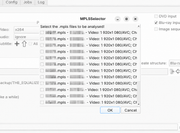
[Image: Pixellierte-MPLS-Auswahlliste.png]

For older eyes like mine, this makes navigating the interface unnecessarily challenging.
Is there currently a way to customise the appearance of these elements, for example by increasing the border contrast, changing their colours or adjusting the UI theme?

If this isn't currently possible, would you consider adding some accessibility-related appearance options in a future version?

I'm not looking for a complete UI redesign, just a way to make the existing controls easier to recognise.

Thanks for your continued work on Hybrid!

Best regards,
tamo_bln
Reply
#2
Quote: Is there currently a way to customise the appearance of these elements, for example by increasing the border contrast, changing their colours or adjusting the UI theme?
  • "View -> font size" allows to change the font size of all elements
  • "View -> Icon / Text" allows to switch between icons or text displayed on buttons.
  • "View -> Toggle Fullscreen" allows to switch between fullscreen and normal mode.
  • "View -> Toggle sidebar" allows to switch the info sidebar on / off.
  • "Config->View->Style" allows to use the predefined styles Qt offers
  • "Config->View->Style sheet" list all qss (Qt Style sheets) that are inside your settings folder.
    You can check where your settings folder is under "Config->Paths->Infos->Settings path". The location can be overwritten be a misc.ini entry. I attached an old / ugly example of a qss file.
Hybrid also should adjust to the design of your OS.

Quote: If this isn't currently possible, would you consider adding some accessibility-related appearance options in a future version?
Problem is: I have no experience in this sort of thing, so it's unlikely I will change something there. + I think qss should allow to change basically anything one might want to change.

Cu Selur


Attached Files
.zip   black-blue_plastique.zip (Size: 1,27 KB / Downloads: 10)
----
Dev versions are in the 'experimental'-folder of my GoogleDrive, which is linked on the download page.
Reply
#3
Here's another example.

Cu Selur


Attached Files
.zip   contrast.zip (Size: 2,05 KB / Downloads: 9)
----
Dev versions are in the 'experimental'-folder of my GoogleDrive, which is linked on the download page.
Reply
#4
Hi Selur,

I've investigated the stylesheet issue further on Fedora Workstation 45 using Hybrid 2026.11.21.2 (AppImage).

Both my custom QSS file and your original 

black-blue_plastique.qss
are located in
/home/user/.hybrid
, which Hybrid reports as its settings path.

However, neither stylesheet appears under Config → View → Style sheet, even after restarting Hybrid.

I also traced filesystem access using
strace
and found no indication that Hybrid attempts to open either QSS file.

Could you clarify the exact directory structure Hybrid expects for custom stylesheets on Linux? Does it require a particular subdirectory or configuration setting?

Thanks!
Reply
#5
Ah, it's a bug the Linux qtStyle list is built too early, before ~/.hybrid is known, so only the empty AppImage styles folder gets scanned.
I'll look into it.

A workaround is to set settingPath=/home/user/.hybrid in ~/.config/hybrid/misc.ini
[General] settingPath=/home/user/.hybrid


Cu Selur
----
Dev versions are in the 'experimental'-folder of my GoogleDrive, which is linked on the download page.
Reply
#6
(21.11.2026, 16:13)Selur Wrote: Ah, it's a bug the Linux qtStyle list is built too early, before ~/.hybrid is known, so only the empty AppImage styles folder gets scanned.
I'll look into it.

A workaround is to set settingPath=/home/user/.hybrid in ~/.config/hybrid/misc.ini
[General] settingPath=/home/user/.hybrid


Cu Selur


Thanks for the hint, that did the magic!  Smile
Reply


Forum Jump:


Users browsing this thread: 1 Guest(s)