





21.11.2026, 14:58
Hi Selur,
I'm currently using Hybrid on Fedora Workstation 45, and I have a question regarding the customisation of its user interface.
I've noticed that the borders and visual separation of certain UI elements, particularly input fields, dropdown menus and other form controls, are sometimes very difficult to distinguish from the surrounding background.
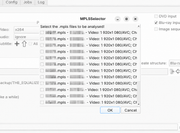
For older eyes like mine, this makes navigating the interface unnecessarily challenging.
Is there currently a way to customise the appearance of these elements, for example by increasing the border contrast, changing their colours or adjusting the UI theme?
If this isn't currently possible, would you consider adding some accessibility-related appearance options in a future version?
I'm not looking for a complete UI redesign, just a way to make the existing controls easier to recognise.
Thanks for your continued work on Hybrid!
Best regards,
tamo_bln
I'm currently using Hybrid on Fedora Workstation 45, and I have a question regarding the customisation of its user interface.
I've noticed that the borders and visual separation of certain UI elements, particularly input fields, dropdown menus and other form controls, are sometimes very difficult to distinguish from the surrounding background.
For older eyes like mine, this makes navigating the interface unnecessarily challenging.
Is there currently a way to customise the appearance of these elements, for example by increasing the border contrast, changing their colours or adjusting the UI theme?
If this isn't currently possible, would you consider adding some accessibility-related appearance options in a future version?
I'm not looking for a complete UI redesign, just a way to make the existing controls easier to recognise.
Thanks for your continued work on Hybrid!
Best regards,
tamo_bln

